- Home
- Departments
- Library
- Services
- Library Makerspace
Library Makerspace
What is a Makerspace?
A makerspace is a place dedicated to creating, individual thinking and open-ended learning. Community members use a variety of tools, various art supplies and building materials to create. This is a hands-on discovery area. The La Vista Public Library has a makerspace area for public use that lets users design, create, and build their own projects.
Using the Makerspace
Outlined below is a list of what the makerspace currently offers and when it is available. You do not need to be a library member to use the makerspace! However, you do need to schedule training before you can reserve to use the machines on your own. So long as you meet the age requirements anyone can receive training and use the equipment.
Receiving Training
Some equipment requires training to use. To get training you will need to talk to the front desk and provide your availability and information on what machine(s) you want to be trained on. You can do this in person or over the phone. A trainer will then contact you within the next few days about setting up a time for you to come in to complete your training.
While you wait, you can watch the required training videos at home before your in-person training session. Everyone using the larger equipment is required to watch the General Safety Video. You can also watch the video related to the specific equipment you are going to be trained on. These training videos can be accessed here: Niche Academy Makerspace Videos
Be sure to write down any questions you have about the videos so we can answer them when we meet you for your in-person training session. In-person training usually takes 20-30 minutes. Your trainer will go over safety information as well as show you how to operate the machine and let you practice using it.
REQUIRES TRAINING - MUST BE RESERVED 30 MINUTES BEFORE USE
- MakerBot 3D Printer : For making plastic 3D prints. Great for creating figurines and small projects.
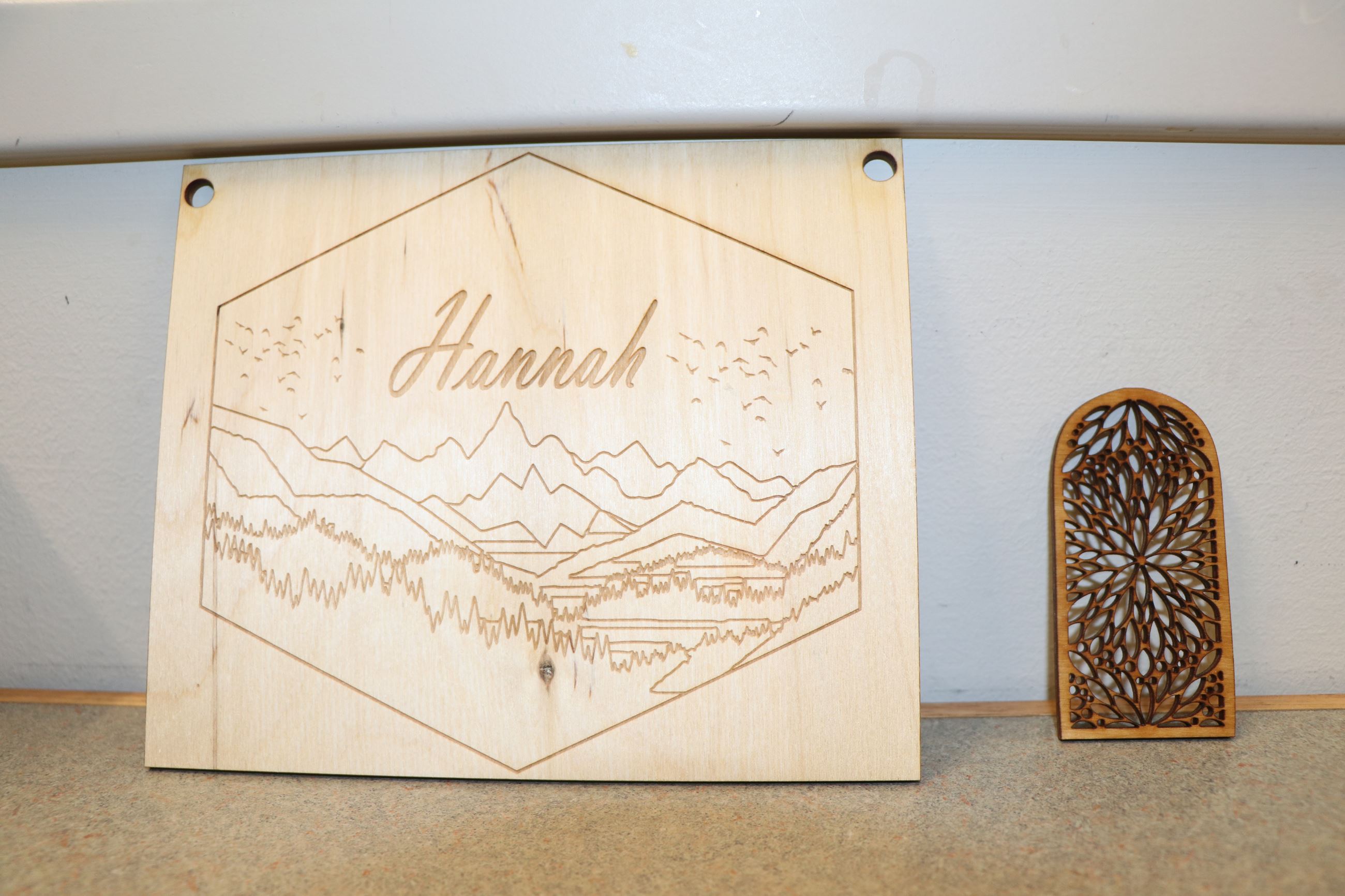
- Laser Cutter : For cutting, etching, and engraving on wood, leather, and glass (among other materials).
- Button Maker : Create your own button to show off your favorite character, advertise your business, use as a party favor or to promote a campaign.
- Laminator : Preserve a paper poster or project by laminating it in plastic warp. Call at least 30 min in advance to use. (The machine takes a while to heat up).
- Heat Press - Imprint designs on shirts, bags, or special mugs. The library has a sublimation printer for making designs.
- Sewing Machine - The La Vista Public Library has a sewing machine available for users 16 and older and for ages 12 to 15 with adult supervision. The user must complete a training session with staff and bring in all supplies needed for their project. The library will supply an iron and ironing board for your use.
WAIVER REQUIRED - MUST BE RESERVED AT LEAST 3 DAYS BEFORE USE
- Virtual Reality Headsets - Virtual Reality headsets are designed to provide an immersive gaming experience by displaying stereoscopic video and allowing users to interact with games using hand controllers. It’s like being inside a giant computer where you can play games or visit different places, such as the ocean or your favorite vacation spot. VR headsets can be reserved for one hour usage. Times will be determined by the staff’s availability and access to the meeting rooms. Library staff will be on hand to help with set-up, recommend pre-downloaded experiences, and provide basic technical support. The manufacturer of Oculus Go warns against use of the product by children under the age of 13. LVPL strongly supports this recommendation but will allow younger children to participate with an adult. Minors under the age of 15 will NOT be allowed to use VR equipment without a parent or legal guardian’s signature and participation.
NO TRAINING NEEDED - OPEN FOR USE DURING LIBRARY OPERATING HOURS
- Tinker Box Kits : Make a bracelet, design a car, try embroidery, build with blocks and more! Great for kids. For use in the makerspace area only. Tinker Boxes are changed monthly.
- Stamps, Stencils, and Crazy Scissors : Paper and ink not supplied. If you want to scrapbook or make some decorations, feel free to bring in your project to the library to work on and utilize the resources we have!
- AccuCut Die-Cutting Machine & Dies - A hand-operated machine that cuts out fun shapes and numbers from paper or cardstock. Various holiday and unique shapes available.
Making a Reservation
After receiving training and signing any necessary waivers, you are now certified to use the machines on your own (or with adult supervision if you are a minor). This means you can reserve a time to come and use equipment you've been trained on.
We ask that you make your reservation at least 30 minutes in advance for makerspace equipment. The first few times you visit we may try and schedule your reservation around a time where a staff member is able to help you if you need extra assistance.
VR use needs to be scheduled at least 3 days in advance. A staff member will need to be available to be with you during your 1 hour using the VR.
Reservations are typically available...
Monday-Thursday - 10 a.m. - 7:30 p.m.
Friday-Saturday - 10 a.m. - 3:30 p.m.
Sunday - No Reservations
The Makerspace closes a half hour before the library. Currently the only machine that can be ran overnight is the 3D printer, but you will still need to pay for the filament used if the print fails.
The library may close or limit reservations in the makerspace during events or when there is limited staff available who know how to use the machines.
Equipment Details
Costs for used materials and supplies are outlined below. These policies can also be found on the library's Policies Page.
If you have any questions about the makerspace, would like to donate materials/equipment, or have suggestions, don't hesitate to let us know!
3D Printer
Print your own 3D models with the MakerBot Replicator+ which offers easy to use software and 10 colors of PLA plastic to choose from. Pre-made 3D models can be found on the Thingiverse website or makers can try their hand at designing their own 3D models on Tinkercad. Makers are welcome to make their designs at home ahead of time and save them on a USB. Files should be saved as an svg. file.
PRINTING WEAPONS IS NOT ALLOWED.
Size: Prints must fit within the print space which is 20.8" (long) x 17.4" (wide) x 16.2" (high).
Age Requirement: 16+ unsupervised / 12+ with adult supervision
Training: This machine requires training before use.
Reservation: At least 30 minutes in advance.
Cost: $.10 per oz. of filament (you are still responsible for paying for failed prints).
Outside Filament: The library does not allow you to bring in your own filament to put in the machine. You must use the filament provided by the library.
Tips: While you can leave your print to run on its own, we recommend you watch until the base layer of your 3D print has been finished. That way you can cancel the print if you notice it is starting to curl or looks unstable. You might want to consider having very long prints run overnight while the library is closed and you can come check it the next day.
Example 3D Printing Projects
Laser Cutter
The Universal Laser Cutter offers a wide range of capabilities from engraving to cutting out designs from wood, paper, and plastic. Materials are available to purchase from the studio to be used with the laser cutter. However, with the current high demand for wood, some supplies may not be restocked. If a maker wants to bring their own material(s) to be used with the laser cutter, they must bring a receipt or leave the label on the item so we can check what it is made of.
Size: Materials must be no more than 16” (long) x 12” (wide) x 4” (thick).
Age Requirement: 16+ unsupervised
Training: This machine requires training before use.
Reservation: At least 30 minutes in advance.
Cost: Free to use. The library sells a variety of wood, glass, and cork to the public. The library charges an at cost price for what they acquire. Prices are listed in the makerspace area and at the front desk. Below you can read pricing for the library's wood sheets. (As of January 2024. Prices may be subject to change).
Prices of Birchwood Sheets
- 1/8" Thick Boards
- 8"x12" = $0.50
- 12"x12" = $1.00
- 12"x16" = $1.25
- 1/4" Thick Boards
- 8"x12" = $0.75
- 12"x12" = $1.10
- 12"x16" = $1.50
Tips: Hard woods do not cut or engrave well. If you are bringing in wood yourself, stick to soft or medium wood types.
Banned Materials: Some materials become toxic if they are put through the laser cutter. If you bring in your own items to cut or engrave, a librarian will check the material so keep the tag or receipt. A list of banned materials can be read here: Laser Cutter Banned Materials
Safety Reminder: Do not look into the laser! It is the equivalent of looking into the sun. It will ruin your eyes. Always keep the filter on when laser cutting to keep sawdust or other fine materials from entering the air.
Example Projects
Heat Press and Mug Press
Make a custom shirt, mug, bag, mouse pad, and more with the library's heat press machines! The library is equipped with a sublimation printer that allows users to print designs onto special transfer paper. Sublimation ink works on polyester blend fabrics or on sublimation ceramic. Designs can be made at the library or you can make a design at home, save it, and bring it to the library to print.
Size:
- Sublimation paper comes in standard 8 1/2" x 11" size.
- You can create a larger design by using multiple sheets of paper and cutting out the shapes (for instance cutting out large letters individually).
- The heat plate is 11" x 15". Designs larger than this will take multiple presses to finish.
- The mug press is slightly adjustable, but we recommend you come look at the machine before you order any sublimation cups online.
Age Requirement: 19+ unsupervised / 12-18 with supervision
Training: This machine requires training before use.
Reservation: At least 30 minutes in advance.
Cost: Fees for printing on sublimation paper.
- 1 sheet of sublimation paper is $1.00
- Other available materials (mugs, ceramic plates etc.) will vary in supply and price. They are sold at an at cost price.
- The library will not sell shirts, bags, aprons, or other fabric materials. You will need to bring in your own materials for these types of projects.
Tips:
- Sublimation ink does not transfer very well onto cotton. If you are transferring a design onto fabric, make sure it is at least 65% polyester.
- If you are doing a design with words, be sure to mirror image the text or it will be backwards when you put it on the design. The transfer paper is placed downwards on your project so it flips the direction when it is melted in.
- It may take a few tries to get the prefect transfer. The heat press may leave a square scorch mark on the fabric before you can fine tune the temperature and press time. Placing a Teflon sheet or butcher paper between your print and the top of the press may help with scorch marks.
Safety Reminder: These machines get very hot! Always wear protective gloves when you use the heat press/mug press. Never touch the hot plate or leave the machine on after use.
Example Projects
Sewing Machine
The library's Singer sewing machine has a variety of stitch types available. We also provide an ironing board and iron for you to use if requested. The large table space in the makerspace makes it an excellent area for you to work on sewing projects.
Age: 16+ unsupervised / 12-15 with supervision
Training: This machine requires training to use.
Reservation: At least 30 minutes in advance.
Cost: Free. The library does not supply any thread or fabric. You will need to bring your own.
Button Maker
This handy machine can make custom pin on buttons. Very easy to use and simple to learn! The library will supply all the parts for the button pin but not any images. You will have to bring your own pictures or print them off in the computer lab.
Size: 2.5" buttons
Age Requirement: 12+ unsupervised / 8-11 with adult supervision
Training: This machine requires training
Reservation: At least 30 minutes in advance.
Cost: $0.35 per button.
Outside Button Parts: We ask that makers use button parts provided by the library to ensure the machine is not jammed or damaged.
Tips: Print out photos and make buttons of family members, friends, and pets! You can also just use construction paper and stickers to make fun buttons for any occasion.
Oculus 2 Headsets
The library has Virtual Reality (VR) headsets that the public can sign up to use.
Age Requirement: Manufacturer recommends 13+. The library will allow younger children to use the headsets with parental permission and supervision. Children under 15 need to have an adult guardian in the room with them in addition to library staff to use the headset. Note: The headsets must be able to fit on the child's head without falling off and their hands need to be able to hold the controllers.
Waiver: A waiver will need to be signed to use the headsets. Some people may experience nausea or dizziness from the experience. Minors under 15 must have an adult sign for them. Teens 15+ may sign the waiver themselves to use the VR headsets. Teens under 15 will need to have a parent come inside and sign the waiver if they would like to use the VR during the library's teen game night.
Cost: Free!
Reservation Time: At least 3 days in advance. Room availability may impact reservations.
Current Games Available:
- Mission ISS - Put on the shoes of an astronaut as you explore the International Space Station! This VR experience was created by NASA and has you complete missions around the space station.
- Ocean Rift - Swim through the oceans and learn about various aquatic life. This immersive experience lets you look at sharks, dolphins, sea turtles, and even a mosasaurus!
- Beat Saber - Get your jam on in this rhythmic music game! You'll swing your arms in tune to the beat to hit the arrows as they fly by you.
- The Curious Tale of the Stolen Pets - This puzzle game has you look for the missing pets! Each level includes a cartoon island with various things for you to interact with. You'll need to pick things up and use them on other items on the island to find the animals. This might include things like finding a hairdryer to melt some ice, using a teapot to water flowers, or finding hidden buttons to push.
- Gorilla Tag - This online game has you play against others in a game of tag, as you guessed it gorillas! This game does feature voice chat, so if parent's do not want their child interacting with others online the audio can be turned off.
- Bait! - Reel in a big fish in this fishing simulator! Practice by yourself or make your way to an online lobby where you can sit and chat with other fishers from across the internet while you catch some award winning fish.
- Got Recommendations for us? We would love to hear them! (The library will not be getting any first person shooter games or games rated M).